
Download Redbooth – Free Project Management Tool for Teams
Overview
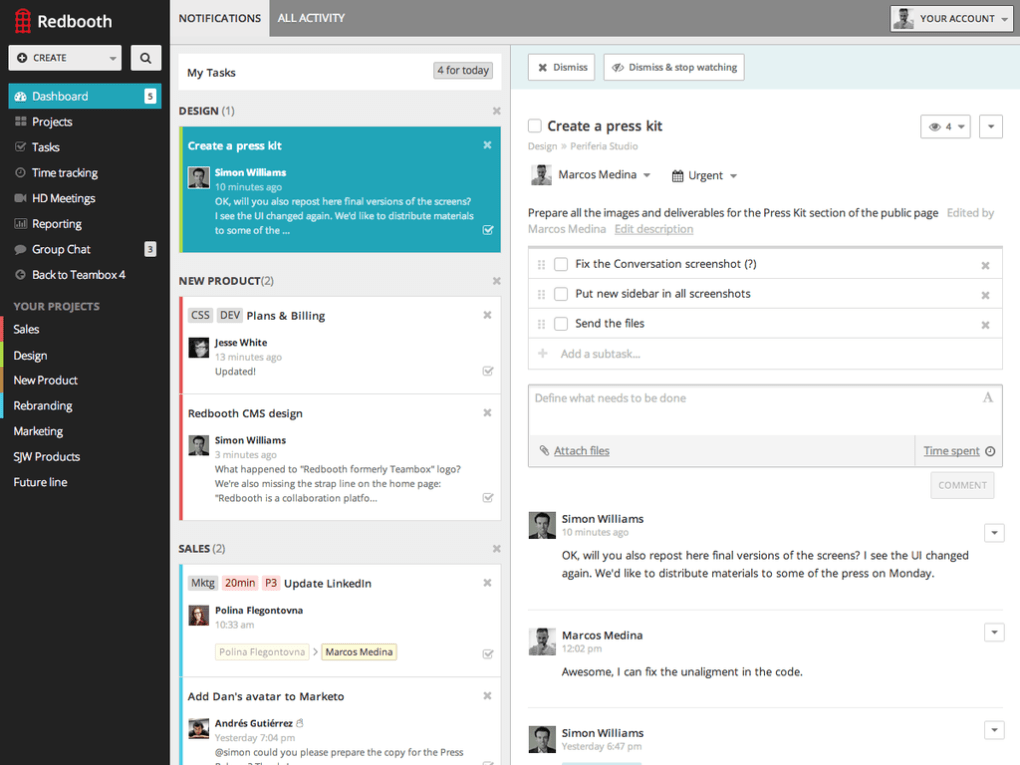
Redbooth is a cloud‑based project management solution designed with small and medium‑sized businesses in mind. It blends a clean, intuitive interface with a solid set of collaboration features that help teams stay organized, meet deadlines, and boost overall productivity. Even if you have limited technical expertise, Redbooth’s guided tutorials and drag‑and‑drop workflow make it one of the easiest tools to adopt on the market today. While a free tier is available, the platform also offers scalable paid plans—Pro and Business—that unlock additional users, storage, and advanced reporting capabilities. Whether you’re coordinating a marketing campaign, managing a software development sprint, or simply tracking daily to‑do lists, Redbooth provides a flexible environment that can be customized to fit the unique processes of any organization.
Key Features That Drive Team Efficiency
- Task Management: Create, assign, and prioritize tasks with due dates, tags, and custom fields.
- Visual Project Boards: Kanban‑style boards give a clear snapshot of work‑in‑progress, backlog, and completed items.
- Time Tracking: Built‑in timer lets team members log hours directly on tasks for accurate billing.
- Real‑time Chat & Messaging: In‑app conversation threads keep communication contextual and searchable.
- File Sharing & Storage: Attach documents, images, and links to tasks with up to 5 GB of storage on the free plan.
- Gantt Charts & Milestones: Visual timelines help managers see dependencies and critical paths.
- Integrated Calendar: Sync tasks with Google Calendar, Outlook, or iCal for seamless scheduling.
- Mobile Apps: Native iOS and Android apps let you manage projects on the go.
- Reporting & Analytics: Generate performance reports, workload distribution, and project health metrics.
- Third‑Party Integrations: Connect with Slack, Dropbox, Zapier, and more to extend functionality.
Each feature is built with a focus on simplicity without sacrificing depth. For example, the Kanban board can be toggled to a list view for users who prefer a linear layout, while the Gantt chart offers drag‑and‑drop adjustments for quick schedule changes. Redbooth also supports custom workflows, allowing administrators to define stage names, approval steps, and automated notifications that match their company’s processes. This adaptability is one of the reasons why the platform scales well from a five‑person startup to a 200‑member department.
Installation & Usage: Getting Started in Minutes
Step‑by‑Step Installation
Redbooth is a web‑based SaaS product, which means there is no traditional installation required on a desktop. To begin, visit the official Redbooth website, click the “Sign Up Free” button, and enter your business email. After confirming your email address, you’ll be prompted to create a workspace name and invite up to five teammates under the free plan. For mobile users, simply download the Redbooth app from the Apple App Store or Google Play Store, log in with the same credentials, and you’re ready to go.
Initial Configuration
Once inside the dashboard, a short onboarding wizard walks you through creating your first project. You’ll select a project template (e.g., “Marketing Campaign” or “Software Development”), set a start and end date, and optionally import tasks from a CSV file. The wizard also introduces the “Quick Add” feature, which allows you to create tasks directly from the top navigation bar without leaving your current view.
Daily Workflow Tips
For daily usage, many teams adopt a “stand‑up” routine within Redbooth: each morning, members update the status of their assigned tasks, add any blockers in the comment section, and move completed items to the “Done” column. The built‑in timer can be started with a single click, ensuring accurate time tracking without the need for external tools. When deadlines approach, the platform automatically sends reminder notifications via email and push alerts, reducing the risk of missed milestones. Additionally, the “My Tasks” view aggregates all assignments across projects, giving each user a personal to‑do list that updates in real time.
Overall, the combination of a web portal and native mobile apps makes Redbooth highly accessible. Whether you’re at your desk, traveling, or working from a coworking space, you can securely access your projects with a single sign‑on (SSO) integration for Google Workspace or Microsoft Azure AD.
Compatibility, Pros & Cons
Supported Operating Systems
Redbooth works on any modern web browser (Chrome, Firefox, Safari, Edge) and offers dedicated desktop clients for Windows 10/11 and macOS 12+. Mobile applications are available for iOS 13+ and Android 8+. The cloud‑native architecture ensures that data is synchronized across all devices instantly, making it a truly cross‑platform solution.
Pros
- Intuitive UI that requires minimal training.
- Generous free tier for up to five users.
- Robust set of collaboration tools (chat, file sharing, time tracking).
- Strong integration ecosystem (Slack, Google Workspace, Zapier).
- Responsive mobile apps for on‑the‑go project management.
Cons
- Free plan limits storage to 5 GB and caps the number of active projects.
- Advanced reporting features are only available in the Business plan.
- Some users report occasional sync delays when using large file attachments.
- Limited custom branding options on lower‑tier plans.
Frequently Asked Questions
Is Redbooth really free for small teams?
Yes. The free tier allows up to five users, provides 5 GB of storage, and includes core features like task boards, time tracking, and basic reporting. It’s ideal for startups or freelancers who need a solid project management foundation without a subscription.
Can I migrate data from another tool such as Asana or Trello?
Redbooth offers CSV import functionality that works with most task‑export formats, including those from Asana, Trello, and Basecamp. After exporting your tasks, you can map columns to Redbooth fields during the import wizard.
Is my data secure on Redbooth’s cloud servers?
Redbooth uses AES‑256 encryption for data at rest and TLS 1.2+ for data in transit. The platform complies with GDPR and offers two‑factor authentication (2FA) to add an extra layer of security for all accounts.
How does Redbooth handle mobile offline access?
Both iOS and Android apps cache recent tasks and comments locally, allowing you to view and edit items without an internet connection. Changes sync automatically once the device reconnects.
What support options are available for paid plans?
Pro and Business subscribers receive priority email support, live chat during business hours, and access to a dedicated knowledge base. Business customers can also schedule one‑on‑one onboarding sessions with a Redbooth specialist.
Conclusion & Call to Action
Redbooth stands out as a user‑friendly, cross‑platform project management solution that balances simplicity with enough depth to serve growing teams. Its free tier is generous enough for small startups, while the paid Pro and Business plans unlock advanced reporting, higher storage limits, and premium support. If you’re looking for a secure, cloud‑based tool that integrates with the apps you already use and offers native mobile access, Redbooth is worth a try. Download Redbooth today and start organizing your projects with a platform that scales as your business does.
Redbooth delivers a clean, intuitive interface paired with robust collaboration tools. The free plan is ideal for small teams, and the upgrade path is straightforward. While storage limits on the free tier and occasional sync delays are minor drawbacks, the overall value proposition remains strong for businesses seeking a flexible, secure project management solution.



.png)



